

If you've ever stood up after an 8+ hour desk day and felt your lower back protest, your hips clamp down, or your legs tingle like they're "asleep," you're not weak—you're mismatched. The goal isn't to endure the pain. It's to fix the chair (and the setup) so your body can stack comfortably for hours.
⚠️ Warning: Pain, numbness, or tingling that's severe, getting worse, or paired with weakness—especially with bowel/bladder changes—needs medical attention. Use this guide for ergonomics, not as a diagnosis.
How to use this guide safely
Scope + Methods (How this guide was built)
-
Scope: This guide covers workplace ergonomics and chair fit to improve comfort during desk work. It is not medical advice and can't diagnose or treat back, hip, knee, or nerve conditions.
-
Evidence base: The recommendations reflect common guidance from occupational health and ergonomics bodies (e.g., OSHA computer workstation guidance) and the ergonomics principles described in ISO 9241 for workstation layout and postural requirements.
-
Method: The recommendations below are based on a repeatable chair-fit check you can do in 5–10 minutes:
-
Lumbar contact test (upright): Sit all the way back and confirm your lower back stays supported without forcing you into an exaggerated arch.
-
Lumbar contact test (light recline): Recline slightly and return upright; the lumbar support should stay in contact in both positions.
-
Seat-depth check: With your hips back, leave about 2–3 inches between the seat edge and the back of your knees.
-
Seat-height + foot support check: Set height so feet are flat (or use a footrest); knees are roughly at a right angle, and hips are level with or slightly higher than knees.
-
Seat-edge pressure check: Make sure the front edge doesn't dig into the backs of your thighs.
-
Armrest + shoulder relaxation check: Adjust armrests so forearms rest while shoulders stay relaxed (no shrugging).
-
Monitor height check: With your chair set, position the screen so the top is at or slightly below eye level, an arm's length away.
Best Office Chair for Back Pain: How to Prevent Lower Back Discomfort
In May 2026, Arbrest conducted a survey, sending questionnaires to women whose jobs require sitting at a desk for long periods. 68.8% of them sit for over 5 hours a day. They're a good snapshot of modern working women, including software developers, data analysts, graphic designers, video editors, writers, marketers, legal assistants, and human resources managers.
In this survey, 40.6% of the interviewed women said their backs felt sore and painful after hours of sitting. 71.9% said they use an ergonomic chair, or they've been looking for a better one to relieve back pain. In conclusion, many women see chairs as both a source and a remedy for workspace pain.
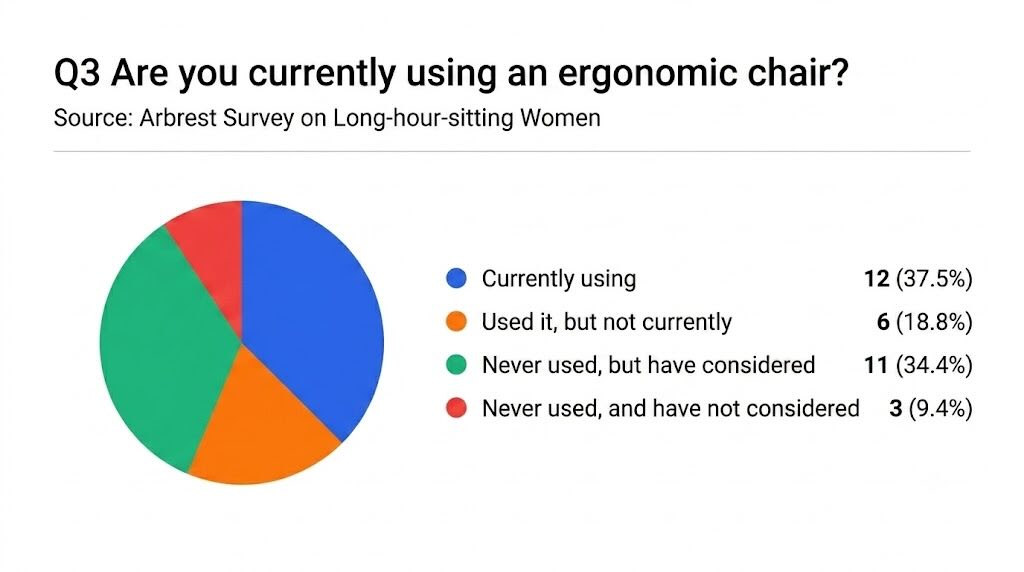
When people like them search for an ergonomic chair for back pain, they're usually not looking for a miracle chair. They're looking for one thing: a position where the spine doesn't collapse into a tired "C" shape by 3 p.m.
A truly supportive ergonomic chair lower back pain setup does two jobs at once:
-
It helps you keep the natural curve of your lower back (lumbar lordosis).
-
It lets you change position without losing support.
Why Does Sitting All Day Cause Severe Lower Back Pain?
Sitting changes mechanics. When you sit for a long time—especially if you slump—your pelvis tends to roll backward, and your lower back can flatten. That shifts the load into tissues that hate being compressed for hours.
The ergonomics guidance from the Mayo Clinic consistently emphasizes fundamentals like a chair that supports your spine, feet flat (or on a footrest), and a workstation that lets your shoulders relax.
What to look for:
-
Height-adjustable lumbar support so the curve hits your lumbar curve, not someone else's.
-
Depth-adjustable lumbar support or a lumbar system that can move in/out, so it supports without jabbing.
Active vs. Passive Lumbar Systems
Not all lumbar support works the same way.
-
Passive (fixed) lumbar pads: They provide a "bump" you can lean into. If the bump lands in the wrong spot, it can feel useless—or annoying.
-
Active/dynamic lumbar systems: These are designed to keep contact as you shift and recline. If you move a lot during the day (you should), a dynamic lumbar system tends to feel more "present" instead of disappearing when you change posture.
A simple way to test this when trying a chair: recline a little, then return upright. If the lumbar support keeps you connected in both positions, it's doing its job.

Material Matters: Mesh Tension vs. Contoured Foam
Material isn't about luxury. It's about pressure and stability.
-
Mesh backs can feel cooler and can support well if the tension is right for your weight and posture. If it's too loose, you'll sag. If it's too tight without contour, it can feel like a trampoline.
-
Contoured foam backs often feel more "shaped," which some people with sensitive lower backs prefer—especially if the foam supports the lumbar curve without a hard ridge.
For many people, the "right" choice is the one that keeps their lumbar curve supported without making them brace their core all day to hold posture.
Why Your Legs Go Numb and How a Height-Adjustable Office Chair Fixes It
Next, let's talk about the second most reported discomfort: leg numbness. If your feet don't feel stable—or the seat edge presses into the backs of your thighs—your legs can start sending warning signals.
Leg numbness is often a combo of pressure + stillness: pressure compresses soft tissue (and sometimes nerves), and stillness reduces circulation.
If you're searching for a chair because your leg goes numb at work, treat it as a fit-and-pressure problem first: seat height, seat depth, and the front edge of the cushion.
Why Do My Legs and Feet Go Numb While Sitting at My Desk?
That "pins and needles" feeling is commonly called paresthesia. It can happen when a nerve is compressed or when blood flow is reduced for a stretch of time.
Cleveland Clinic explains that pins and needles can be a normal short-term response to pressure on a nerve, but persistent or unexplained symptoms should be taken seriously. WebMD similarly notes that sitting positions (including sitting still or crossing your legs) can briefly compress nerves and that changing position usually resolves it.
The chair-feature connection:
-
If the seat is too high, the seat edge can press against your knees.
-
If the seat is too deep, the front edge can dig into the back of your knees.
-
If the seat edge is hard or ill-shaped, pressure concentrates rather than spreading.
Finding Your Ideal Seat Height for Optimal Circulation
Use this as a quick setup formula for a height-adjustable chair:
-
Sit back so your lower back touches the backrest.
-
Adjust height so feet are flat on the floor (or on a footrest).
-
Aim for knees at about 90 degrees (or slightly more open).
-
Check that your hips are level with or slightly higher than your knees.
Pro Tip: If you're shorter and your desk is fixed-height, you often have to choose: relaxed shoulders or flat feet. Choose shoulders relaxed (keyboard at elbow height) and add a footrest so your lower body stays supported.
The Role of Adjustable Seat Depth for Varied Leg Lengths
A modern solution is an adjustable office chair. With all the options in the market priced from $20 to $2,000, remember that a height-adjustable office chair isn't truly height-adjustable for real bodies unless it also lets you tune seat depth. Here's the test:
-
Sit all the way back.
-
You should have roughly 2–3 inches of space between the seat edge and the back of your knees.
If you're around 5'0" to 5'3" tall, seat depth is often the difference between "this chair is fine" and "why are my legs tingling again?" Check the height adjustment range before buying an ergonomic chair. It should allow for a minimum seat height of around 16 inches (or lower).
How to Choose a Comfortable Office Chair for Long Hours to Protect Your Knees
Knees are another vulnerable part of the body. Actions like running and jumping can hurt our knees, and sitting can too. Knees usually complain when your lower body stays in awkward angles for too long.
A comfortable office chair for long hours keeps your knees in a neutral position relative to your hips and feet—without you having to "tuck" your feet under the chair to feel stable.
Can a Poorly Adjusted Office Chair Actually Cause Knee Pain?
Yes, a poorly fitted chair can contribute to knee pain. If your chair is too high, you may point your toes down to reach the floor, slide forward and lose back support, or tuck your feet under you. Over time, those workarounds can increase strain around the knee joint.
The fix usually isn't a special "knee pain chair." It's getting the seat height + foot support + recline working together.
Relieving Joint Strain with a Recline and Tilt Mechanism
A good recline system does more than "lean back." It should provide a synchronized tilt (seat and back move together). This feature opens the angle at your hips and reduces constant pressure on your lower back.
A recline that locks in multiple positions helps you shift posture without losing your workspace.
Research on sitting often highlights that static posture is a problem. A CDC/NIOSH report discusses prolonged static sitting as a contributor to low-back disorders and explores seating concepts that redistribute load and encourage movement.
Even without special equipment, the practical takeaway is simple: your chair should make it easy to change posture. Four of our surveyed women specifically said they would love a chair that provides the same comfort no matter how they shift posture.
Footrests and Alternative Support for Long-Haul Comfort
If your desk height forces your chair higher than ideal, a footrest is not "extra." It completes the setup. A footrest helps you keep your feet supported, reduce pressure behind the knees, and keep hips and knees at a comfortable angle.
The Mayo Clinic explicitly recommends using a footrest when raising the chair to match desk height, so that your feet no longer reach the floor. Check its "Home office ergonomics tips".
You can find ergonomic chairs with a built-in footrest. It's either folded beneath the chair or hidden with slide trays. Some chairs need you to buy separate footrests. Check the footrest options before you buy a chair.
Finding the Perfect Ergonomic Chair for Hip Pain Relief
Above your legs and knees, your hips support most of your weight when sitting. Thus, hip pain after work is often less about the hip joint and more about hip flexors + pelvis position + pressure on sit bones.
An ergonomic chair for hip pain should allow your pelvis to sit in a neutral position and support your weight without forcing you into a single rigid posture.
If you're comparing office chairs for hip pain, prioritize seat-depth adjustability (so you're not perched) and a seat that supports your sit bones without bottoming out.
Why Do My Hips Feel Extremely Tight and Painful After Work?
When you sit, your hip flexors shorten. Hold that for hours daily, and your body adapts: standing up can feel like you're "unfolding" from the chair.
If you also slump, the pelvis can tilt in ways that change how your lower back and hips share load. This is where movement breaks matter (more on that later). But chair fit matters too.
Seat Pan Width, Cushioning, and Contour Design
For hip comfort, you're managing two things:
-
Pressure distribution (sit bones and soft tissue)
-
Stability (not sliding forward, not perching)
A seat that's too narrow compresses. A seat that's too wide can make armrests unusable and pull shoulders inward.
Look for enough width that you're not squeezed, and supportive cushioning that doesn't bottom out after an hour. You will also need a subtle contour that supports without trapping you.
If you tend to get numbness, pay attention to the seat edge shape (a "waterfall" style edge usually feels gentler behind the knees).
Mid-Day Relief: Micro-Breaks and Chair Stretching Exercises
A little hip exercise can save the day. Of course, you don't need a full yoga session to feel better at 2 p.m. You need small interruptions. Try these 3 chair stretching exercises that can be done at your desk:
-
Seated Figure‑4 stretch (glutes/hips)
-
Sit tall.
-
Cross your right ankle over your left knee.
-
Keep your back straight and hinge forward slightly until you feel a stretch.
-
Hold 20–30 seconds. Switch sides.
-
Seated torso twist (mid-back reset)
-
Sit tall, feet flat.
-
Place one hand on the opposite thigh and gently rotate.
-
Hold 15–20 seconds on each side.
-
Seated hip flexor "unfold" (mini version)
-
Scoot to the edge of the chair.
-
Plant your feet flat and gently squeeze your glutes for 5 seconds.
-
Release and repeat 5–8 times.
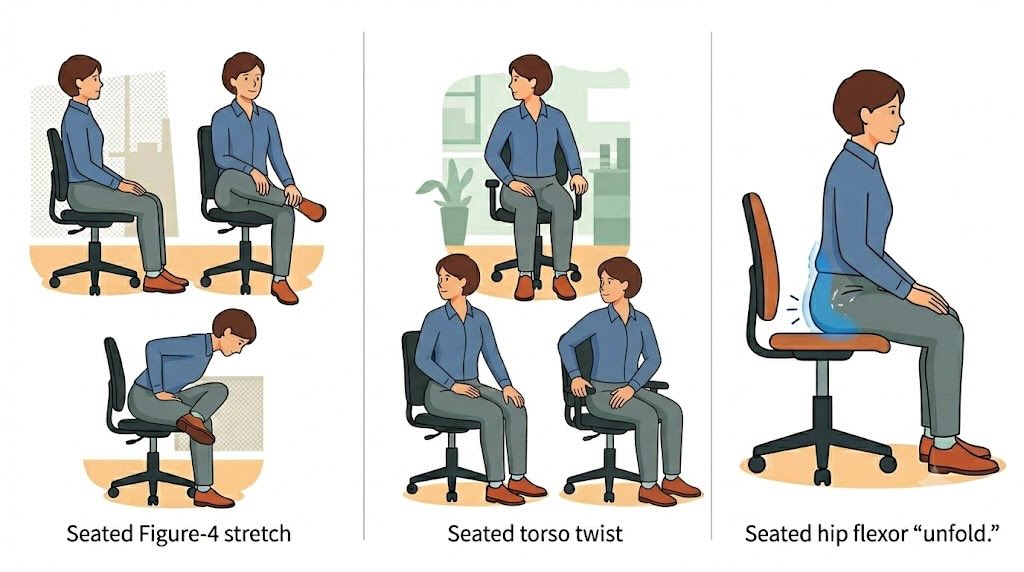
Office Exercise for Hip Pain Relief
Cleveland Clinic's workplace-pain content frequently emphasizes that frequent movement and posture changes matter for desk-job discomfort. My chiropractor recommended building in daily movement breaks. You can do it too!
How to Manage Workplace Body Pain with Targeted Ergonomics
If you're reading this because your pain has a name—sciatica, tailbone pain, neck pain—you want targeted fixes, not generic posture advice.
If you're actively dealing with ergonomic chair questions for knee pain, focus first on seat height, foot support, and a recline mechanism that lets you shift posture without tucking your feet under you.
What Causes Shooting Sciatica or Tailbone Pain While Sitting?
Sciatica is nerve pain that typically radiates from the lower back into the buttocks and down the leg. It can feel sharp, burning, or electric, and it often worsens with prolonged sitting.
Mayo Clinic notes that sciatica pain can worsen when sitting a long time, and it highlights red flags like sudden weakness or bowel/bladder issues that warrant immediate care. For a deeper medical overview, NIH's NCBI Bookshelf explains sciatica as symptoms from nerve irritation/compression and outlines conservative management.
For tailbone or sit-bone pressure, the chair matters in a different way: you want to reduce direct pressure on bony points.
What can help (non-medical, comfort-focused):
-
A seat with better pressure distribution.
-
If you're sensitive at the tailbone, a U‑shaped or cutout cushion can reduce direct loading.
If pain is severe, persistent, or changing quickly, treat that as a health issue—not an "ergonomics problem."
Upper Body Alignment: Defeating Neck Pain and Shoulder Tension
Neck and shoulder tension is often a reach problem. If your monitor is too low, you crane your neck. If your keyboard/mouse is too far, you reach. If armrests are too high, your shoulders ride up all day.
Mayo Clinic's workstation guidance is blunt and helpful:
-
monitor directly in front, about an arm's length away
-
top of the screen at or slightly below eye level
-
wrists straight; upper arms close to the body
-
set up so shoulders can relax (Mayo Clinic — "Office ergonomics: Your how-to guide")
NIH workplace ergonomics guidance echoes the same core setup logic: elbow-height work surface, forearms parallel to the floor, monitor at eye height.
Chair feature to prioritize here:
-
Highly adjustable armrests (height + width + forward/back) so your forearms can rest without shrugging.
-
A headrest is optional; for some people, it helps during recline breaks, but it shouldn't push your head forward.
Systemic Relief: Improving Poor Circulation and Hip Flexor Tightness
Two truths can coexist:
-
A better chair can make your default posture less stressful.
-
No chair can cancel out eight hours of stillness.
If you only remember one principle, make it this: support + movement.
WebMD notes that brief leg numbness can happen when nerves are compressed by sitting positions and that changing positions can help prevent it. That's why dynamic sitting (small shifts, occasional recline) plus regular breaks is the "systemic" fix.
Beyond the Chair: Creating a Holistic Ergonomic Ecosystem
A great chair can still fail you if your whole workspace setup forces a forward head posture or your desk height forces your shoulders up.
Aligning the Desk and Monitor with Your New Seating Position
Use these quick checkpoints:
-
Monitor: top of the screen at or slightly below eye level.
-
Distance: roughly an arm's length.
-
Keyboard/mouse: close enough that elbows stay near your sides.
These steps work because they reduce the "micro-reaches" that turn into daily strain.
The 20‑8‑2 Rule for Movement
Use the 20‑8‑2 rule as a simple rhythm:
-
20 minutes sitting (supported)
-
8 minutes standing (unlocked knees, relaxed shoulders)
-
2 minutes moving (walk, stairs, light mobility)
If that feels ambitious at first, start with one "2-minute move" per hour and build up.
Conclusion & Ergonomic Buyer's Checklist
An ergonomic chair isn't generic office furniture. It's preventative health hardware—because it changes how your body absorbs eight hours a day.
Before you buy, run this quick checklist against your body and your pain pattern:
-
Adjustable seat height + stable foot support: feet flat (or footrest), knees around 90°, hips level or slightly higher.
-
Adjustable seat depth: leave ~2–3 inches behind the knees when seated back.
-
Real lumbar support: adjustable in height (and ideally depth) so your lower back stays supported without forcing you rigid.
-
Recline/tilt you'll actually use: makes posture shifts easy during long hours.
-
Armrests that let shoulders drop: adjustable enough that forearms rest without shrugging.
53.1% of the interviewed women said their golden rule for a comfortable chair is simple: sit for an hour and see if they need to adjust themselves to fit the chair. Alternatively, if you are shopping online, look for a dynamic support system that adapts to your back, not the other way around.